Table of Contents
What Is a CRM and Does Your Small Business Need One?
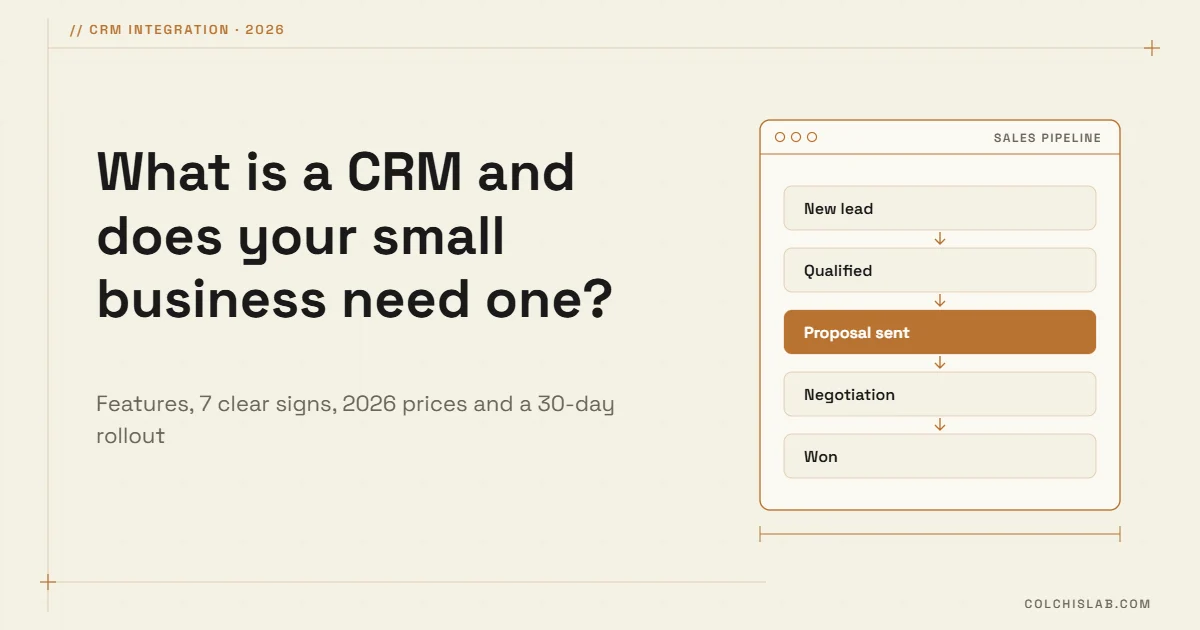
What is a CRM? A CRM (customer relationship management) system is software that keeps every lead and customer in one shared place: who they are, every call and email, and where each deal stands. For a small business the real question is not only what is a CRM, but when a spreadsheet stops being enough. For most teams that moment comes earlier than they expect.
Below you will find what a CRM actually does, how small businesses manage customers today, seven clear signs you need one (and when you don’t), what it costs in 2026, and how to roll it out in 30 days.
Table of Contents
What is a CRM, in plain words?
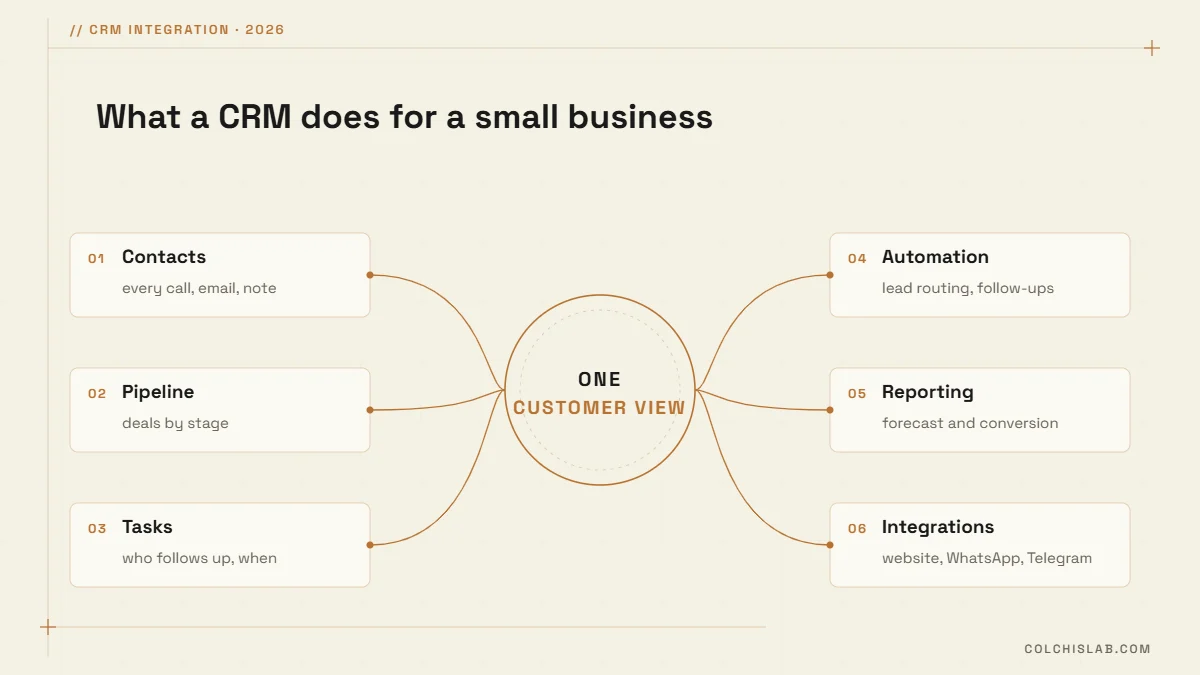
Think of a CRM as your company’s shared memory for sales. Instead of customer details living in personal inboxes, WhatsApp chats and someone’s head, everything sits in one record the whole team can see. Most CRM systems cover six jobs:
- Contacts: one record per person or company, with every email, call, note and file.
- Pipeline: deals moving through stages (new, qualified, proposal, won or lost), usually on a drag-and-drop board.
- Tasks and reminders: who follows up, with whom, and when.
- Automation: new leads assigned to the right person, follow-up emails sent, deals moved automatically.
- Reporting: conversion rates, revenue forecasts and team activity on one dashboard.
- Integrations: website forms, email, phone, WhatsApp, Telegram and accounting connected to the same customer record.
How small businesses manage customers today
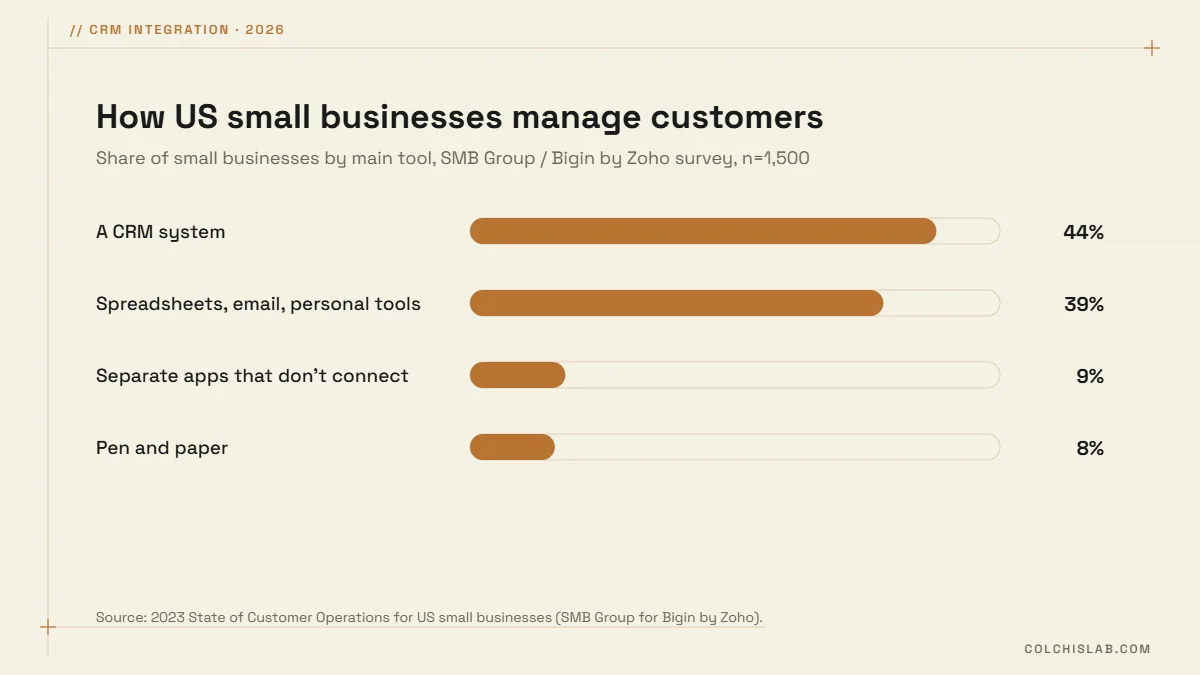
If you still run sales from a spreadsheet, you are not alone. In a 2023 survey of 1,500 US small businesses by SMB Group for Bigin by Zoho, 56% did not use a CRM. About 39% relied on a mix of spreadsheets, email and personal tools, 9% used separate apps that don’t talk to each other, and 8% still used pen and paper.
The cost of that setup is mostly invisible: a lead that waited two days for a reply, a quote nobody followed up, a customer history that left with a salesperson. Salesforce’s State of Sales 2026 found that sellers spend only about 40% of their time actually selling. The rest goes to admin, data entry and looking for information. A CRM won’t fix everything, but it removes much of that friction.
Does your small business need a CRM? 7 clear signs
Once you know what is a CRM, the next question is timing. These are the signals we see most often in small teams:
- Leads come from several channels (website form, phone, Facebook, Instagram, WhatsApp) and some of them get lost.
- Follow-ups depend on someone remembering, and deals quietly go cold.
- Customer information lives in personal inboxes and phones, so it leaves when an employee leaves.
- More than one person talks to the same customers.
- You can’t say in under a minute how many deals are open and what will close next month.
- Your spreadsheet has duplicates, version conflicts or a “final_v3” copy.
- You repeat the same manual steps every week: quotes, welcome emails, payment reminders.
If three or more sound familiar, a CRM will likely pay for itself through recovered deals alone. Capterra’s 2026 CRM buyer research found that inefficiency is the most common reason businesses move to a new CRM (36%), followed by missing features (33%).
When you probably don’t need one yet
- You work alone with a handful of repeat clients and few new leads.
- You sell one-off, with no follow-up or repeat purchase.
- Your online shop or booking tool already tracks customers well enough for now.
What does a small business CRM cost in 2026?
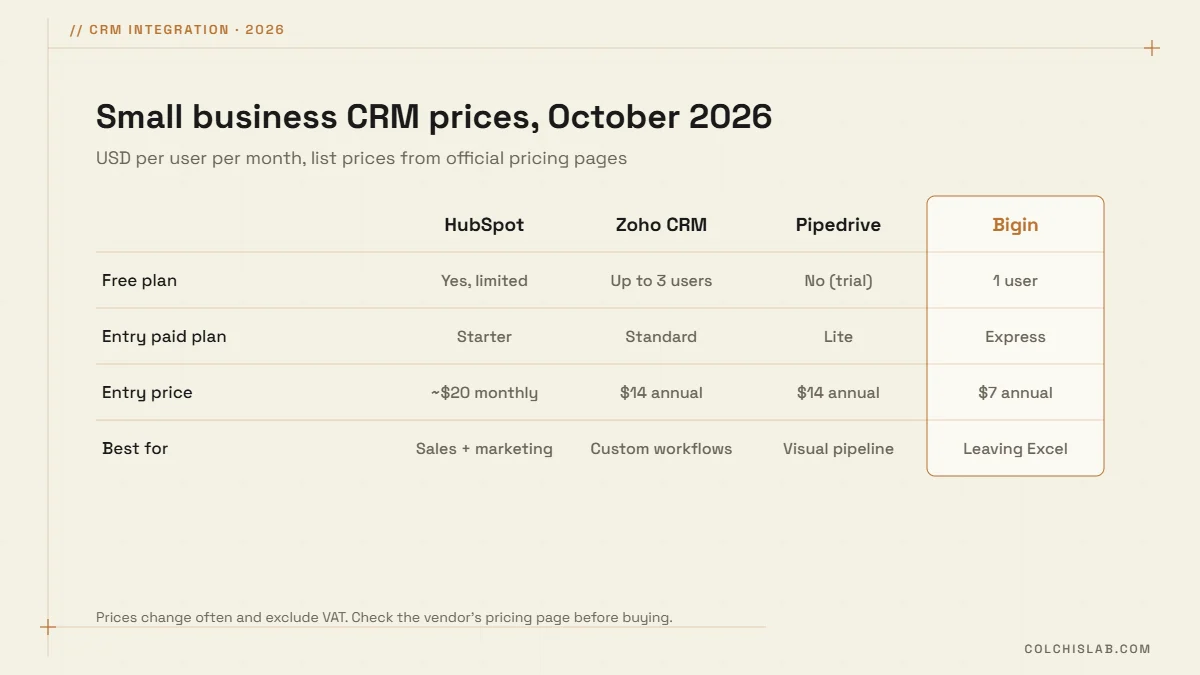
A small business CRM is no longer an enterprise expense. Several vendors offer free plans, and paid plans usually start at around $7–$20 per user per month. List prices from the vendors’ pricing pages in October 2026:
| CRM | Free plan | Entry paid plan | Best for |
|---|---|---|---|
| HubSpot | Yes, with limits | Starter, about $20/user/mo (monthly billing) | Sales and marketing in one place |
| Zoho CRM | Yes, up to 3 users | Standard, $14/user/mo (annual billing) | Custom workflows on a budget |
| Pipedrive | No (14-day trial) | Lite, $14/user/mo (annual billing) | A visual pipeline for small sales teams |
| Bigin by Zoho | Yes, 1 user | Express, $7/user/mo (annual billing) | Very small teams leaving spreadsheets |
The licence is usually the smaller part of the cost. The bigger investment is setup: importing contacts, designing pipeline stages that match how you really sell, and connecting your website and messengers so leads arrive on their own. That is where most CRM projects succeed or fail.
What makes a CRM worth it: integrations
A CRM that someone has to fill in by hand quickly turns into a second spreadsheet. The value appears when it is connected to the rest of your business:
- Website forms create a lead automatically, including the page and ad it came from.
- Every new lead triggers an instant Telegram or email alert to the right person.
- WhatsApp and Telegram conversations are saved to the customer record.
- Quotes and invoices are created from the deal instead of being retyped.
This is exactly what we build at Colchis Lab: CRM integration between your website, bots and the tools you already use. If response time matters in your market, read how we approach speed-to-lead and automated sales pipelines.
How to roll out a CRM in 30 days
- Week 1, map your process. List the 4–6 stages a deal really goes through and who owns each one.
- Week 2, clean and import data. Merge duplicates and keep only the fields you will actually use.
- Week 3, connect lead sources. Website forms, email, WhatsApp and Telegram, so new leads arrive without manual entry.
- Week 4, train the team. Agree one rule: if it isn’t in the CRM, it didn’t happen. Review the pipeline together every week.
Start simple. Most small teams need one pipeline, a few automations and a weekly report, not every feature on the pricing page. You can add more once the basics stick.
Not sure which CRM fits your business or how to connect it to your website? Send us a short brief and we will suggest a setup with a clear price, or see how our pricing works.
What is a CRM in simple terms?
A CRM is software that stores all your leads and customers in one shared place, with every call, email and deal stage, so the whole team can see where each customer stands and what to do next.
Do small businesses really need a CRM?
Not always. If you work alone with a few repeat clients, a spreadsheet can be enough. Once leads come from several channels or more than one person talks to customers, a CRM prevents lost leads and missed follow-ups.
How much does a CRM cost for a small business?
Several CRMs have free plans. Paid plans usually start at around $7–$20 per user per month. The bigger cost is setup: data import, pipeline design and integrations.
Can I use Excel or Google Sheets as a CRM?
For a handful of customers, yes. Spreadsheets break down with several users, duplicates, no reminders and no automatic lead capture from your website or messengers.
What is the difference between a CRM and an ERP?
A CRM manages customers, leads and sales. An ERP manages internal operations such as inventory, accounting, purchasing and production. Many businesses connect the two.
Can a CRM connect to my website, WhatsApp or Telegram?
Yes. Most modern CRMs offer APIs and integrations, so website forms, WhatsApp and Telegram messages can create or update customer records automatically.